
A single SIM in a remote monitoring router creates a single point of failure. If the primary network experiences an outage, the connection drops and the SCADA system loses visibility of the remote site until connectivity is restored. For non-critical monitoring applications this may be acceptable. For utilities infrastructure, environmental monitoring with regulatory reporting obligations, or any application where data loss has operational or legal consequences, dual SIM failover is standard practice.
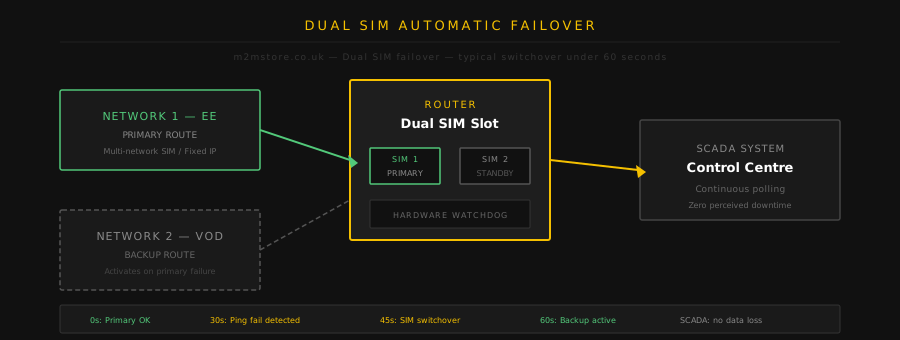
How Automatic Failover Works
The Milesight UR75 and UR35 both support dual SIM with automatic failover. SIM 1 is configured as primary. SIM 2 is standby. The router continuously monitors the primary connection using configurable ping tests to a known host (typically the SCADA server IP or a reliable public address). If pings fail for a configurable threshold period – typically 30 to 60 seconds – the router automatically activates SIM 2 and establishes a new connection on the backup network. When the primary recovers, the router can be configured to switch back automatically or remain on backup until manually intervened.
Primary and Secondary SIM Strategy
A common approach is to use different mobile networks for SIM 1 and SIM 2. If SIM 1 is on EE and SIM 2 is on Vodafone, a localised mast outage on one network is unlikely to affect the other simultaneously. An alternative is to use a multi-network roaming SIM as primary and a single-network SIM as backup – the roaming SIM provides the best normal-operation coverage while the backup provides a known-cost failsafe.
Configuring Failover on the UR75
In the UR75 web interface, navigate to Network > Cellular. Set the primary SIM slot and configure the APN for SIM 1. Enable SIM switching and set the failover detection method – ICMP ping is the most reliable. Set the ping target, interval, and threshold. Configure SIM 2 with its APN details. Set the recovery behaviour. The complete configuration takes around 10 minutes. DeviceHub can push this configuration to a fleet of routers without visiting each site.
Monitoring Failover Events
DeviceHub logs all SIM switching events with timestamps. If a site switches to backup SIM regularly, this indicates intermittent primary network issues that may warrant investigation – a poorly oriented antenna, a mast being loaded heavily at certain times, or a genuine coverage gap. Regular failover events are a useful early indicator of connectivity problems before they become outages.